
Concerned about your data, targeted advertising, or online surveillance? This tutorial series shows you how to replace Big Tech services with free, open-source alternatives that respect your privacy, and take back control of your digital life.
Chrome, developed by Google, is a closed-source web browser that is a key part of a tracking and surveillance empire which profits from your personal data. Much of what you do in Chrome is logged and analyzed, and even features like “Incognito mode” are not truly anonymous. Similar data collection practices exist in other major browsers, including Edge (Microsoft) and Safari (Apple).

The web also plays a role, as it’s increasingly plagued with cookies and trackers. For most people, cookies and trackers are abstract concepts. But it becomes very real when you see dynamic pricing in action — your online behavior is tracked, and companies use that data to adjust prices based on what they know about you. For example, when you find the price of a ticket has gone up since the last time you looked, it may merely be that they know you are more likely to buy for fear it will go up even more. It’s become so profitable that much of the web now incorporates trackers that send your behavioral data to advertisers and data brokers.
And even if you choose a browser that doesn’t spy on you, such as Firefox, “browser fingerprinting” is a method of tracking web browsers by configuration, settings, browser extensions and other information visible to websites. As an exercise, you can check your browser’s vulnerability to fingerprinting by visiting coveryourtracks.eff.org.
The good news is that there are ways to navigate the dystopia that the internet has become, by using privacy-respecting search engines and browsers:
Best Private Search Engines
Most browsers, even open source ones like Firefox, ship with Google as the default search engine. This means that our most intimate details can be immediately sent to Google, which holds a near-total monopoly on web searches with over 90% of the market share. As well, searches on Google are now processed by Gemini, an AI engine, with negative consequences: AI models are terrible for privacy and contribute to climate chaos.
We recommend these alternatives:

Duckduckgo search
Duckduckgo, a US-based company, delivers anonymized search results from a variety of sources, but depend heavily on Bing (Microsoft). DuckDuckGo is one of the few available options on Apple’s Safari browser. Duckduckgo has incorporated AI into searches, but you can turn it off by using noai.duckduckgo.com. Add as the default by going to Settings > Search (Engine) in your browser.

More options:
Other options to try include Swisscows.com, Lilo, Ecosia, and meta-search engines, which aggregate results from multiple search engines. One example is searXNG, you can self-host or access ones that other people host at searx.space.
Note on search suggestions: Most browsers send the queries you type in real time. even before you hit enter. Disable this feature for better privacy.
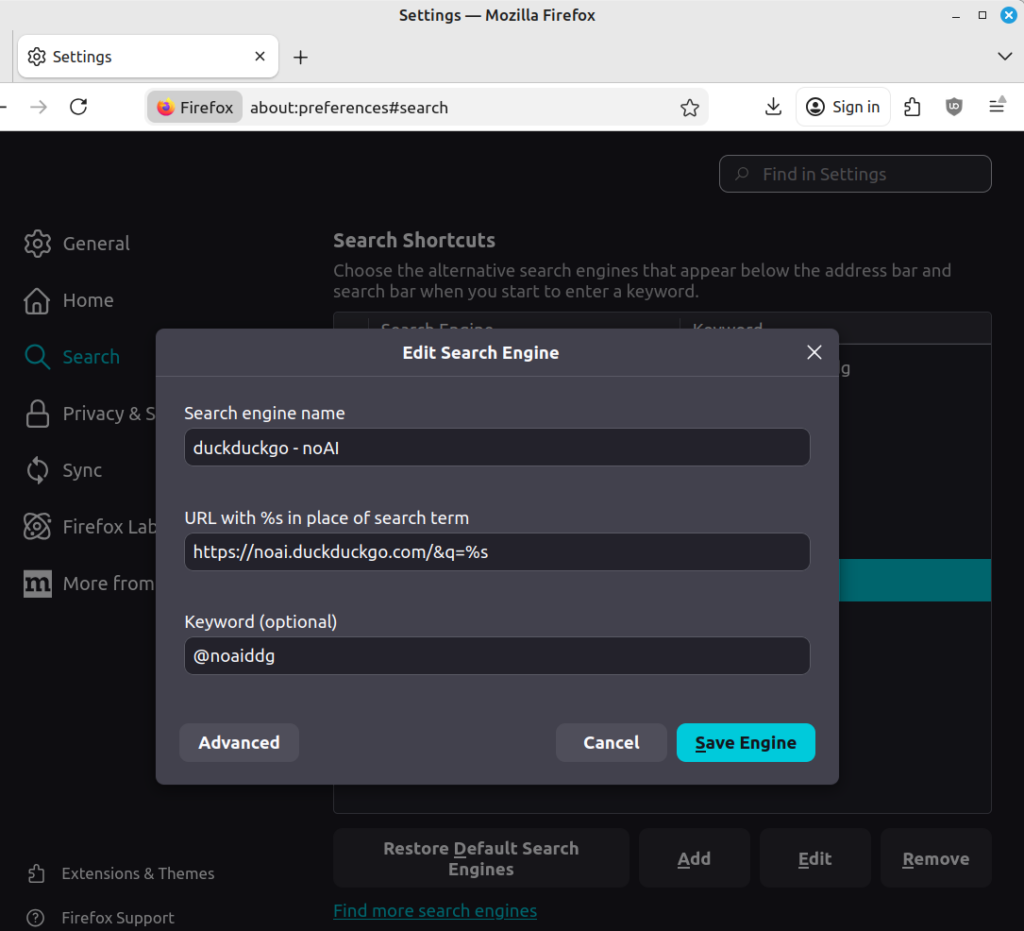
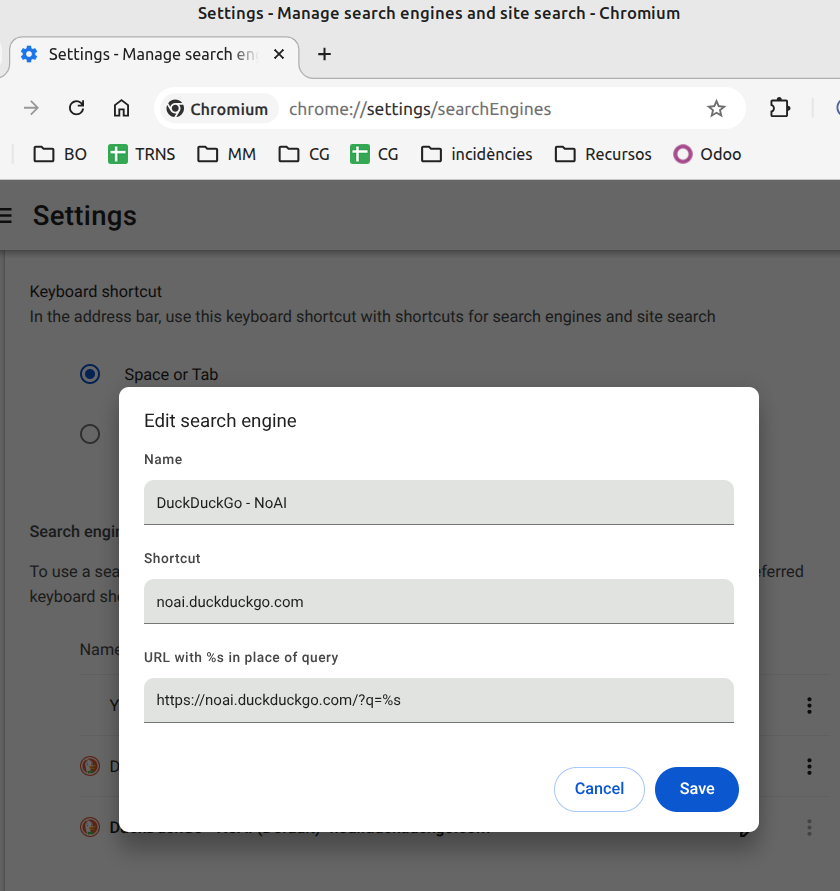
To manually enable one of these search engines as a default, go to Settings > Search (Engine) and manually add as seen here:
Limitations to Private Browsing on Android
If you use a stock Android device with Google integrated into the OS, you can install alternative browsers—but the OS itself may still leak telemetry, such as keyboard input and Gemini AI integrations, or by access to your microphone. For truly private browsing, consider purchasing a degoogled device or performing a DIY install on a compatible device. De-Googling the OS provides a baseline assurance that it won’t send data back to Google or the manufacturer.
That said, privacy is a journey. Even on a Googled Android device, you can take steps to make it harder for Big Tech to harvest your data by installing an alternative browser.
Limitations to Private Browsing on iOS
On iOS, Apple enforces a tightly controlled walled garden. While you can download alternative browsers from the App Store, they are all required to use Apple’s WebKit engine. This means that, regardless of your choice—Safari, Chrome, Firefox, or another browser—the underlying WebKit engine (and thus many behaviors, limitations, and data flows) remains unchanged. In practice, this significantly limits meaningful choice on Apple devices.
Firefox Focus, a stripped-down version of Mozilla Firefox, can prevent websites and third parties from tracking you across sessions. The Onion Browser or Brave can help prevent fingerprinting if anonymity is your goal. But in general, Safari may be the best option. Consider using uBlock Origin Lite or AdGuard for additional protection. If you value control over your device and data, consider a degoogled Android device for your next purchase!
Anonymous Browsing
Anonymity is a cornerstone of a free society—essential for democracy, whistleblowing, research, and freedom of expression, especially under repressive regimes. While a trusted VPN can help, nothing matches the Tor Project for anonymity.

Tor Browser
The Tor Browser is the gold standard for anonymous browsing. All traffic is routed through the Tor network, making it extremely difficult—or impossible—to analyze or track, provided you avoid logging in or using services that could identify you. Tor is highly resistant to fingerprinting. Network speeds on Tor can be slow, as your traffic—and others’—is routed through multiple hops for anonymization. For maximum security and anonymity, use Tails: a bootable USB OS that routes all internet traffic through Tor. It is available for Windows, Linux, MacOS, and Android. iOS users should install Onion Browser, which is a version of the Tor browser.
Privacy-Respecting Browsers:
Brave Browser – all platforms
Brave, developed by a US company, relies on an advertising-based business model—but with minimal data collection. Based on Chromium (the open-source foundation of Google’s Chrome), Brave excels at blocking fingerprinting and trackers. Brave includes a built-in ad blocker but also encourages users to sign in and view ads to earn cryptocurrency. It is available for iOS, Windows, Linux, macOS, and Android (from the Play Store/Aurora Store, or on F-Droid it can be installed using FFUpdater)

Cromite – Windows, Linux & Android
Cromite is a more private version of Chromium, removing google telemetry and adding an adblocker. For Windows or Linux, manual installation is required: download the .zip or tar.gz from GitHub. On Android, it can be installed from F-Droid using FFUpdater
Firefox Focus – iOS and Android
Firefox Focus is a stripped-down version of Firefox, designed to erase your browsing history each time you close the browser. It offers far better protection against trackers and fingerprinting than standard Firefox. The Mozilla Foundation, which develops Firefox, receives funding from Google. In return, Google is set as the default search engine, among other concessions. We recommend changing the default to a privacy-respecting option, such as Startpage. Firefox Focus is available only on mobile: iOS and Android (from Play/Aurora, or on F-Droid it can be installed using FFUpdater)


iodé Browser – Android only
At iodé, we modify Firefox to remove Google telemetry and include a large set of privacy-respecting search engines (with Startpage as the default). Unlike Firefox Focus, the iodé Browser is the full Firefox experience, allowing you to use it for logins and across sessions. Add our f-droid repository by opening F-droid, and from Settings > repositories, tap the “+” button to scan the QR-code of the iodé F-Droid repository.
Mullvad Browser – desktop only
The Mullvad Browser is a Tor-based browser designed for anonymous or private browsing—without relying on the Tor network. It offers nearly the same protections against fingerprinting and tracking as Tor, especially when paired with a trustworthy VPN like iVPN, Mullvad, Njal.la, or ProtonVPN. It is often faster than the Tor network. As with Tor, avoid logging into accounts or adding browser extensions if anonymity is your goal. The browser already includes privacy extensions; adding more could increase your fingerprinting risk.
That said, if your goal is privacy rather than full anonymity, the Mullvad Browser is still an excellent choice. It is available for Linux, Windows, and macOS.

IronFox – Android only
IronFox is a very similar project to LibreWolf, but for Android. It can be installed from F-Droid using FFUpdater, and is also available on the Accrescent app store.
For those using the DuckDuckGo search engine, the Duckduckgo browser is a good choice, though we hesitate to recommend it as it is not open-source on all platforms. Available for Windows, MacOS, iOS, and Android (F-Droid, Play Store)
More resources:
privacytests.org
eylenburg’s browser comparison table
wikipedia: A Comparison_of_search_engines
Wikipedia: A Comparison_of_web_browsers
Be smarter than your phone!
At iodé, we specialize in developing private and secure software for mobile devices. If you’d like to buy a device with iodéOS preinstalled, please visit our shop! These sales help pay for the development of the software. That said, you can also DIY install: iodéOS is open source, available for installation on 60+ devices.
We are passionate about helping people regain control over their technology, and we offer this set of tutorials to help people overcome their dependency on big tech.
Coming up next: Degoogle your private life #6 – Password managers.
Articles about degoogling
- DeGoogle Your Private Life #1 – Mail
- DeGoogle Your Private Life #2 – Contacts and Calendar
- DeGoogle Your Private Life #3 – Maps and Navigation
- DeGoogle Your Private Life #4 – Real time messaging
- DeGoogle Your Private Life #5 – Private Web Browsing
- How to degoogle your Android phone
- How to watch YouTube without being tracked
- The Best YouTube Alternatives