
Becoming an iodéOS beta tester has never been easier. Starting with the April update, you can join the program with just one tap—get early access to new features and help shape the future!
The Old Way: A Thing of the Past
No more complicated steps or special beta updaters. We have simplified the process so anyone can join the beta program in seconds.
How to Become a Beta Tester: One Tap, Done!
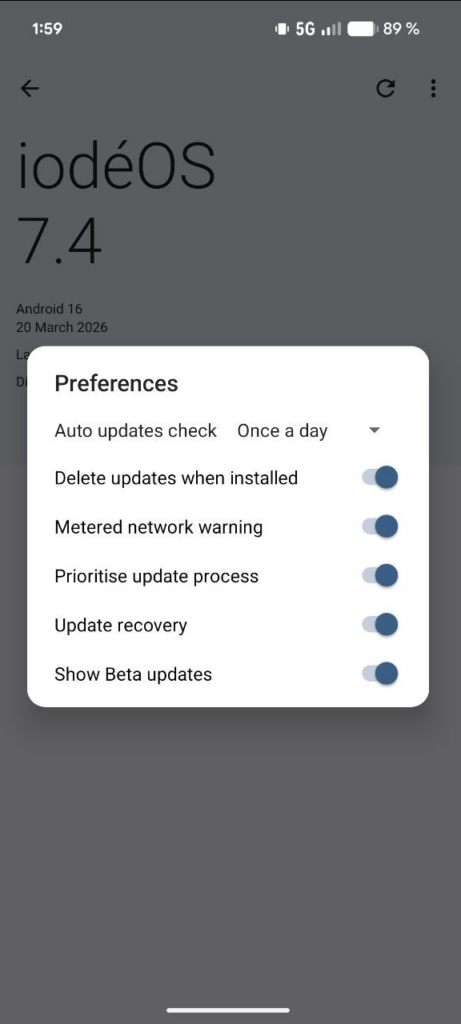
- Open the Updater App on your device.
- Go to Settings.
- Toggle the “Show Beta Versions” switch.
- That’s it! Beta updates will now appear alongside stable releases.
Why Join the Beta Program?
- Try New Features: Be the first to explore updates like the brand-new spam blocker.
- Help Improve iodéOS: Share your feedback to perfect iodéOS.
What to Expect as a Beta Tester
Beta versions give you early access to new features, but they can sometimes behave unpredictably. Key points to keep in mind:
- Expect Glitches: Beta versions are experimental, and occasional bugs may occur.
- Understand Rollback Limits: Once you install a beta, you cannot revert to an earlier version—you must wait for the stable release or the next beta update to catch up.
Join the Community
Share your feedback and connect with other beta testers in the official iodéOS beta testers’ Telegram group or on the community forum.
Ready to Dive In?
Becoming an iodéOS beta tester is now effortless. With just a tap, you can start exploring the latest features and contribute to the future of iodéOS. Why wait? Toggle that switch and join the beta adventure today!